Популярные игры 2026 года
Наиболее скачиваемые релизы за текущий год
 Poppy Playtime - Chapter 5
18.02.2026
Poppy Playtime - Chapter 5
18.02.2026
 Resident Evil Requiem Deluxe Edition
26.02.2026
Resident Evil Requiem Deluxe Edition
26.02.2026
 Carmageddon: Rogue Shift
06.02.2026
Carmageddon: Rogue Shift
06.02.2026
 Scritchy Scratchy
18.03.2026
Scritchy Scratchy
18.03.2026
 Nioh 3 Digital Deluxe Edition
05.02.2026
Nioh 3 Digital Deluxe Edition
05.02.2026
 Car Service Together
04.02.2026
Car Service Together
04.02.2026
 Escape from Yandere
07.02.2026
Escape from Yandere
07.02.2026
 Styx: Blades of Greed - Quartz Edition
19.02.2026
Styx: Blades of Greed - Quartz Edition
19.02.2026
 DEATH STRANDING 2: ON THE BEACH
19.03.2026
DEATH STRANDING 2: ON THE BEACH
19.03.2026
 Berry Bury Berry
29.01.2026
Berry Bury Berry
29.01.2026
 Exotica 2: Pet Shop Simulator
21.01.2026
Exotica 2: Pet Shop Simulator
21.01.2026
 Subnautica 2
01.02.2026
Subnautica 2
01.02.2026
 Crimson Desert
19.03.2026
Crimson Desert
19.03.2026
 RIDE 6
12.02.2026
RIDE 6
12.02.2026
 Hordes of Hunger
12.02.2026
Hordes of Hunger
12.02.2026
 Red Passport: Ticket to Russia
22.01.2026
Red Passport: Ticket to Russia
22.01.2026
 Rainbow Gate
30.01.2026
Rainbow Gate
30.01.2026
 FATAL FRAME II: Crimson Butterfly REMAKE Digital Deluxe Edition
11.03.2026
FATAL FRAME II: Crimson Butterfly REMAKE Digital Deluxe Edition
11.03.2026
 Transport Fever 3
01.02.2026
Transport Fever 3
01.02.2026
 Relooted
10.02.2026
Relooted
10.02.2026
Virtual Circuit Board 1.0.0 — торрент-раздача для PC
Версия игры: 1.0.0 | Обновлено: 09.02.2026 05:04
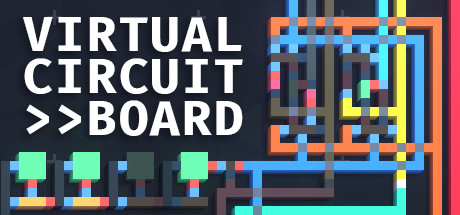
"Virtual Circuit Board" (VCB) — это симулятор логических цепей, который предлагает игрокам полную свободу в создании и экспериментировании с цифровыми схемами без каких-либо учебных пособий или уровней. Игра ориентирована на тех, кто уже имеет базовое понимание логических ворот и схем. Основные особенности: 1. Свобода творчества: Игроки сами определяют цели и задачи своего проекта — какую схему они хотят создать и как. 2. Мощная симуляция: Использует высокопроизводительную систему импульсной симуляции, где сигналы передаются между компонентами в один тик за раз.
Дата выхода
2023 (06.10.2023)
Рейтинг Steam
93% (222 отзыва)
Последнее обновление
09.02.2026 05:04
Доступные версии игры
1.0.0
Разработчик
Reverie Foundry
Издатель
Reverie Foundry
Репакер
Лапочки
Игра в подборках:
Языки интерфейса
английский
Описание игры
"Virtual Circuit Board" (VCB) — это симулятор логических цепей, который предлагает игрокам полную свободу в создании и экспериментировании с цифровыми схемами без каких-либо учебных пособий или уровней. Игра ориентирована на тех, кто уже имеет базовое понимание логических ворот и схем.
Основные особенности:
1. Свобода творчества: Игроки сами определяют цели и задачи своего проекта — какую схему они хотят создать и как.
2. Мощная симуляция: Использует высокопроизводительную систему импульсной симуляции, где сигналы передаются между компонентами в один тик за раз. Возможность моделирования до нескольких миллионов обновлений в секунду.
3. Редактор ассемблера: Позволяет создавать свои инструкции и программировать виртуальную память, доступную для схем.
4. Два режима работы: Режим редактирования использует инструменты черчения для изменения схем, а режим моделирования позволяет наблюдать за работой схемы и исполнением ассемблерных инструкций.
Интерфейс и создание:
- Рисование на основе: Строите схемы путем рисования цветовых элементов, таких как логические ворота и проводники. Инструменты оптимизации, такие как "Array", позволяют рисовать несколько проводников одновременно.
- Оформление: Декорируйте схему, добавляя слои оформления, которые перекрывают стандартные цвета компонентов. Это даёт возможность создавать такие элементы как кнопки и метки, изменяющие свой вид в зависимости от состояния компонента.
VCB — это инструмент для тех, кто уже знаком с основами цифровой электроники, предоставляющий уникальную платформу для реализации собственных проектов в области логических схем.
Основные особенности:
1. Свобода творчества: Игроки сами определяют цели и задачи своего проекта — какую схему они хотят создать и как.
2. Мощная симуляция: Использует высокопроизводительную систему импульсной симуляции, где сигналы передаются между компонентами в один тик за раз. Возможность моделирования до нескольких миллионов обновлений в секунду.
3. Редактор ассемблера: Позволяет создавать свои инструкции и программировать виртуальную память, доступную для схем.
4. Два режима работы: Режим редактирования использует инструменты черчения для изменения схем, а режим моделирования позволяет наблюдать за работой схемы и исполнением ассемблерных инструкций.
Интерфейс и создание:
- Рисование на основе: Строите схемы путем рисования цветовых элементов, таких как логические ворота и проводники. Инструменты оптимизации, такие как "Array", позволяют рисовать несколько проводников одновременно.
- Оформление: Декорируйте схему, добавляя слои оформления, которые перекрывают стандартные цвета компонентов. Это даёт возможность создавать такие элементы как кнопки и метки, изменяющие свой вид в зависимости от состояния компонента.
VCB — это инструмент для тех, кто уже знаком с основами цифровой электроники, предоставляющий уникальную платформу для реализации собственных проектов в области логических схем.
Скриншоты из игры (10)
Трейлер и видео из игры (1)
Системные требования
| Параметр | Минимальные | Рекомендуемые |
|---|---|---|
| ОС | Windows 10 | — |
| Процессор | 3.0 GHz+ | — |
| Память | 8 GB | — |
| Видеокарта | OpenGL 3.3+ / 2 GB VRAM / 1366 x 768 | — |
| Место на диске | 300 MB | — |
Часто задаваемые вопросы
Как скачать игру через торрент на qoob.name?
Откройте страницу нужной игры, например Virtual Circuit Board, и нажмите кнопку скачивания .torrent-файла. Затем откройте загруженный файл в любом торрент-клиенте (qBittorrent, Transmission и т.д.). Раздача начнётся автоматически — дождитесь завершения загрузки и приступайте к установке.
Безопасно ли скачивать раздачи с этого сайта?
Все раздачи на qoob.name проходят проверку перед публикацией — файлы сканируются на наличие вредоносного кода. Тем не менее мы рекомендуем держать антивирус включённым и проверять загруженные файлы самостоятельно. Если какая-либо раздача вызывает сомнения, сообщите нам через форму обратной связи.
Как установить игру после скачивания?
После завершения загрузки откройте папку с файлами и запустите setup.exe или install.exe — в большинстве раздач установщик стандартный. Для репаков от популярных репакеров следуйте инструкции в файле readme.txt, который обычно находится в корне папки. Virtual Circuit Board 1.0.0 устанавливается аналогичным образом.
Можно ли обновить игру до последней версии?
Мы стараемся выкладывать актуальные версии игр. Если вы скачали Virtual Circuit Board версии 1.0.0, проверьте страницу игры — при выходе патча мы обновляем раздачу или добавляем отдельный файл обновления. Подпишитесь на уведомления, чтобы не пропустить новые версии.
Какой торрент-клиент лучше использовать?
Рекомендуем qBittorrent — он бесплатный, без рекламы и поддерживает все необходимые функции. Также подойдут Deluge и Transmission. Достаточно установить клиент, открыть в нём скачанный .torrent-файл и указать папку для загрузки. Никаких специальных настроек для раздач с qoob.name не требуется.